Beyond Words: Why Your "Image to Text" Tool Fails at Formulas and Tables
Instead of magic, you get a digital car crash.
While these platforms are popular for basic text extraction, they consistently fail when it comes to formulas and tables. The table headers get mixed with the footer, and that elegant calculus formula transforms into a string of random characters. In 2026, "text recognition" is solved—but structural intelligence is where most tools fall apart.
The "Plain Text" Trap
Most OCR tools are built on legacy engines designed to read books. They look for lines of characters, one after another. This works great for a novel, but it's disastrous for:
- Scientific Papers: Where subscripts and superscripts carry the meaning.
- Financial Reports: Where the relationship between a row and a column is the "text."
The Reality Check: If your OCR tool doesn't understand the geometry of your document, it isn't giving you data—it's giving you a puzzle to solve.
The Math Problem: From Gibberish to LaTeX
When a standard OCR encounters an equation like the Gaussian Integral, it sees shapes, not logic.

Standard OCR Output
S e^(-x2) dx = sqrt(pi)(If you're lucky. Usually, it's much worse.)
FreeOCR.ai Output
$$\int_{-\infty}^{\infty} e^{-x^2} dx = \sqrt{\pi}$$Ready-to-use LaTeX code
By converting images directly into LaTeX, FreeOCR.ai saves researchers and students hours of manual formatting. You can drop the code straight into Overleaf or Word and keep moving.
The Table Chaos: Why Alignment Matters
Extracting a table as "plain text" is useless. You need the grid. Most top-tier sites strip away the formatting, leaving you with a vertical list of numbers that have lost their context.
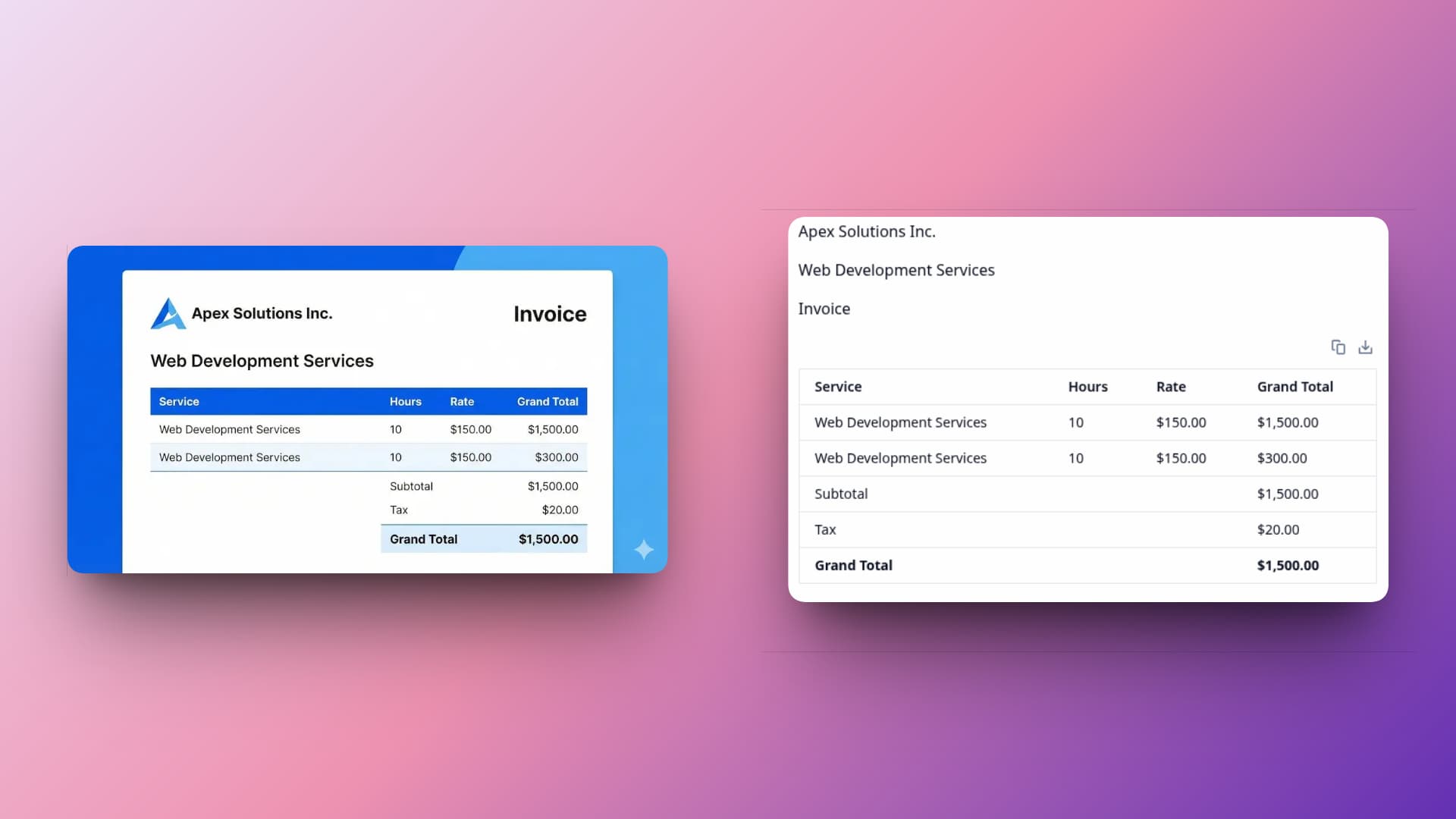
FreeOCR.ai leverages advanced Large Language Model (LLM) technology to understand and reconstruct tables:
The AI "sees" the table structure just as a human does
Generates precise HTML code that preserves every cell
Zero data loss between complex rows and merged columns
Why FreeOCR.ai is Different
| Capability | Basic OCR Sites | FreeOCR.ai |
|---|---|---|
| Standard Text | High Accuracy | High Accuracy |
| Math & Physics | Fails (Character soup) | Full LaTeX Support |
| Multi-line Tables | Breaks (Merged cells) | Grid Preservation |
| Handwritten Notes | Hit or Miss | AI-Enhanced |
The Verdict: Don't Just Extract Text, Extract Intelligence
In a world where data is everywhere, the ability to quickly digitize complex information is a superpower. If you are a student, a data analyst, or a developer, you don't have time to fix "dumb" OCR mistakes.
Stop settling for tools that only see half the picture. Switch to a tool that understands the logic behind the pixels.
Ready to see the difference?
Try FreeOCR.ai for your toughest formulas and tables today.